
Which Real Estate Virtual Tour Type Does Your Property Actually Need?
Sep 1, 2026


14 MIN READ
A virtual tour real estate listing can mean three very different things: a 360 photo tour or dollhouse scan, a video walkthrough, or a custom-built interactive 3D and AR/VR walkthrough. Which one you need depends on whether the property is built, how far away your buyers are, and whether finishes can change. This guide names which type fits which property, what each costs, and when to skip the expensive option.
Here is the position most tour vendors will not put in writing: if you have a finished home priced under a million dollars and local buyers, book a 360 scan and stop there. A custom walkthrough would be money wasted. The custom category earns its cost only in specific situations, and this guide draws that line honestly.
Key Takeaways
- Virtual tours split into three types: 360 photo/dollhouse scans, video walkthroughs, and custom interactive 3D or AR/VR walkthroughs.
- A hired Matterport scan runs $350–$600 for a standard home; a custom VR walkthrough runs $20,000–$50,000 (thefuture3d.com and r2u.io, 2026).
- Only a custom 3D walkthrough works for a property that has not been built yet — a 360 scan needs a physical space to capture.
- Zillow removed all Matterport 3D tours in October 2025, making data portability a real factor when choosing a platform.
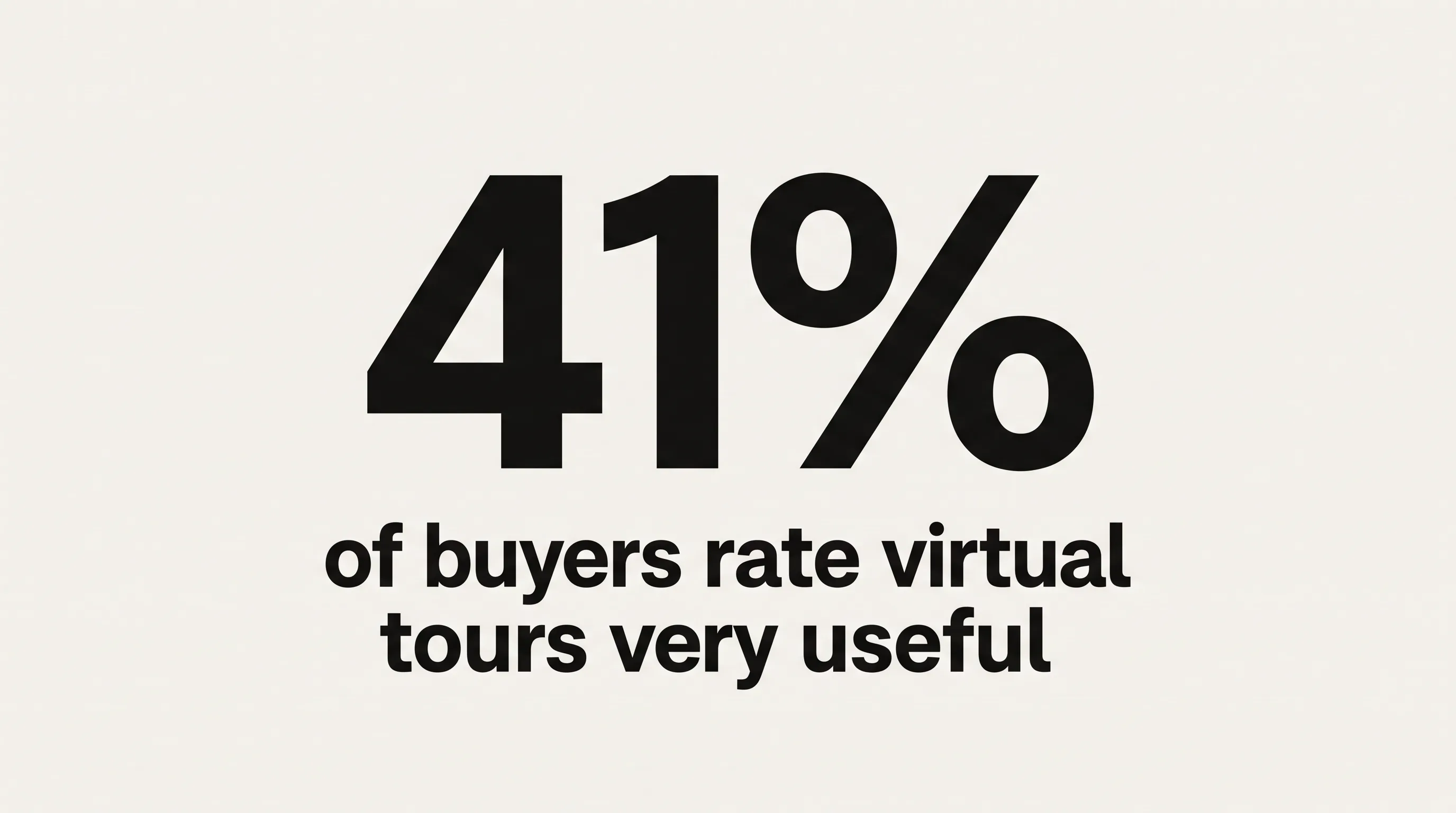
- 41% of buyers rate virtual tours “very useful,” but the type of tour matters as much as having one (NAR 2025).
What Types of Real Estate Virtual Tours Exist?
Real estate virtual tours come in three distinct technologies that most people collapse into one phrase. A 360 photo tour lets a buyer look around from fixed points. A video walkthrough plays a fixed path the buyer watches. A custom interactive walkthrough lets the buyer move freely, change things, and even step inside in a headset. The right label matters, because each type solves a different problem and carries a different price.
360 Photo Tours and Dollhouse Scans
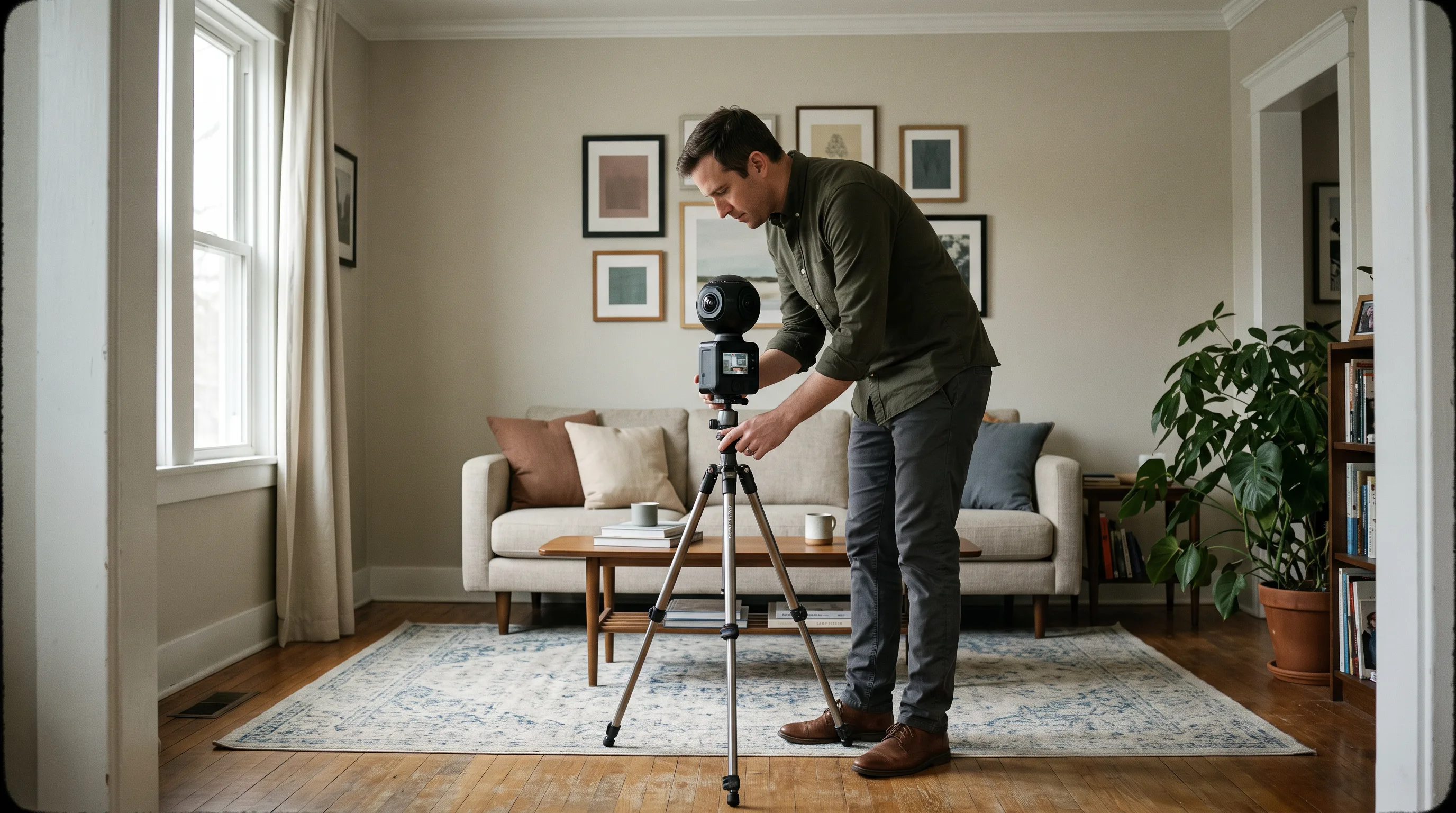
A 360 photo tour stitches panoramic images captured at fixed camera positions, letting a buyer look in every direction and jump between rooms through hotspots. This is the format most people picture when they hear “virtual tour.” Platforms include Matterport, 3DVista, Zillow 3D Home, CloudPano, and Kuula, typically shot with a Matterport Pro 3, a Ricoh Theta, or an Insta360 camera. A plain 360 tour records no spatial data. Matterport adds LiDAR depth, which produces the orbiting dollhouse view and a measurable floor plan.
Video Walkthroughs
A video walkthrough is a recorded clip in which an agent or videographer moves through a property along a single pre-set path. The buyer watches; the buyer cannot navigate. It is the cheapest option after still photos and embeds on any platform, from a listing page to Instagram. The limitation is control. A viewer cannot linger in the kitchen, look up at the ceiling height, or check the view from a specific window. Video answers “what does this place feel like,” not “let me inspect it myself.” Some SERP guides blur video and interactive tours together; they are not the same thing.
Interactive 3D and AR/VR Walkthroughs
An interactive 3D or AR/VR walkthrough gives the buyer full spatial freedom: walk any path, open doors, swap finishes, switch between unit types, or experience the property at full scale in a headset. These are built in real-time engines such as Unreal Engine from CAD, BIM, or Revit files, or from photogrammetry of an existing space. They run in a browser through WebXR with no app download, on a Meta Quest 3, or on an Apple Vision Pro. This is the only type that works for a property that does not physically exist yet, which is exactly where the fork in this guide begins.
What’s the Difference Between a 360 Tour and a Matterport 3D Scan?
A 360 tour and a Matterport 3D scan differ in one thing that changes everything: spatial data. A plain 360 tour from CloudPano, Kuula, or 3DVista stitches panoramic photos at fixed points, so the buyer looks around but the software captures no room dimensions and no point cloud. A Matterport scan uses a LiDAR-equipped camera, the Pro 2 or Pro 3, to record imagery plus accurate depth, producing a measurable digital twin with the dollhouse view and a schematic floor plan.

That extra spatial layer is why a Matterport scan costs more than a CloudPano 360 shoot, and why Matterport needs its own proprietary hardware while CloudPano, Kuula, and 3DVista accept consumer 360 cameras like the Ricoh Theta.
There is a practical wrinkle that arrived in late 2025. CoStar acquired Matterport in April 2024 for $1.6 billion, and in October 2025 Zillow removed every Matterport 3D tour from Zillow.com and StreetEasy after CoStar declined to renew the Matterport API agreement. Agents who had paid for scans watched them vanish from the largest portal overnight. “CoStar’s ongoing efforts to wall off data and restrict how real estate professionals use the content they pay for is harmful to everyone in the industry,” a Zillow spokesperson said in October 2025. The lesson is not which company was right. The lesson is that the platform you choose today can lose distribution tomorrow, so ask who controls the pipe before you commit.
How Much Does a Real Estate Virtual Tour Cost?
Real estate virtual tour costs span a 300-to-1 range, from free to six figures, depending on type, property size, and delivery format. A 360 platform is a monthly subscription or free. A Matterport scan is a per-listing fee plus a subscription. A custom VR walkthrough is a project fee measured in tens of thousands. Knowing the ranges up front stops you from either overspending on a resale condo or under-scoping a pre-construction launch.

360 Platform and Matterport Pricing
A hired Matterport scan costs $350–$600 for a standard 2,000–3,000 square foot home, $600–$1,000 for homes of 3,000–5,000-plus square feet, $750–$2,000 for commercial spaces, and $2,000–$5,000-plus for large venues, according to thefuture3d.com’s 2026 cost guide. Matterport subscriptions run from free for one space to $9.99 a month for five, $69 a month for 25, and $309 a month for 100 spaces, with add-ons for floor plans ($50), the MatterPak bundle ($100), an E57 point cloud export ($150), and a video flythrough ($150 per minute), per thefuture3d.com’s Matterport pricing breakdown.
The alternatives price differently:
| Platform | Cost | Notable trait |
|---|---|---|
| Zillow 3D Home | Free | Displays only on Zillow; cannot embed elsewhere |
| CloudPano | $22.50–$199/mo | MLS-compliant cloning, white-label, live video chat |
| Kuula | $20–$36/mo | WebXR (in-browser VR) support |
| 3DVista | €499 one-time + €99/yr hosting | No recurring software subscription |
| Matterport | $0–$309/mo + scan fee | LiDAR spatial data, dollhouse view |
One number agents miss: a DIY Matterport setup shooting five homes a month costs roughly $7,500–$9,000 a year once you fold in camera amortization, subscription, and hosting, per thefuture3d.com. At that volume the “free” DIY route is really a mid-four-figure annual line item. Below about three listings a month, hiring a scanner per shoot is cheaper than owning the gear.
Custom VR Walkthrough and AR/VR Pricing
A custom VR walkthrough costs $20,000–$50,000 for a residential property and $30,000–$100,000-plus for a multi-unit or pre-sale development. Headset-specific builds price separately: a minimal Apple Vision Pro experience starts near $5,400, and a full launch with multiple floor plans, finish customization, and CRM integration runs $14,000–$90,000, according to R2U’s April 2026 analysis. Four things drive the number: the asset source (existing CAD/BIM/Revit files are cheaper to start from than building geometry from scratch), the level of interactivity, the number of unit types, and whether you deliver on the web or in a headset.
This is the point where off-the-shelf capture ends and commissioned work begins. For a full breakdown of what shapes those figures, see our guide to AR/VR real estate walkthroughs. The rest of this article stays vendor-neutral about when you should even be reading it.
Need help with a real estate virtual tour?
We are here to help!
When Should You Use a Standard 360 Scan — and When Should You Go Custom?
Most finished residential listings should use a 360 scan, not a custom walkthrough. That is the honest answer, and it is the one no vendor product page will give you plainly. A Matterport or CloudPano shoot covers the common case fast and cheap. Custom interactive work earns its cost only when the property cannot be scanned, when buyers need to change something inside the tour, or when the sales setting demands a headset. The two sections below draw that line.
What Off-the-Shelf 360 Capture Handles Well
Off-the-shelf 360 capture handles finished, existing homes better than any custom build for the price. A standard resale listing turns around in 24–48 hours, embeds into MLS and IDX systems through a shareable URL, and costs $350–$600 for a typical home. It also does the one job the data supports most strongly. A Harvard Business School analysis of 75,178 transactions found virtual tours mainly serve a filtering function, screening unqualified buyers before a showing rather than lifting the final price.
That filtering is worth real money in saved showings and fewer “how big is the second bedroom” calls. Buyers reward it, too: 63% have made offers on properties seen only virtually, according to Redfin data reported in 2026, and listings with 3D tours receive 87% more views per Realtor.com. If your home is built, priced under a million, and selling to a local market, book the scan and move on. Do not over-engineer it.
Six Scenarios Where 360 Capture Isn’t Enough
360 capture breaks in six specific situations, and each one points toward a custom interactive walkthrough. The common thread: the buyer needs to do something a fixed panorama cannot support, or there is no physical space to photograph in the first place.
- Pre-construction and off-plan property. Nothing physical exists to scan.
- Configurable finishes. Buyers want to compare oak against walnut flooring inside the tour.
- Multi-unit developments. One model has to represent forty units with varied layouts.
- Commercial and industrial space. Dimensional accuracy and fit-out options outrank ambiance.
- Headset delivery. A sales gallery running Apple Vision Pro or Meta Quest 3 cannot stream a Matterport scan.
- Remote, relocating, and international buyers. Passive panoramas give less spatial confidence than a free-movement walkthrough.
When your listing lands in one of these buckets, the tool changes. The technology behind that shift is our virtual reality development practice, and AR-overlay variants come from our augmented reality agency work, where a buyer can see a vacant unit furnished or renovated on a phone.
Can You Create a Virtual Tour for a Property That Hasn’t Been Built Yet?
Yes, you can create a virtual tour for an unbuilt property, but not with a 360 scan, because scanning needs a physical space to capture. The only viable path for pre-construction is a custom 3D walkthrough built from architectural drawings, BIM data, or Revit files. This scenario is common: pre-construction condos, spec homes, build-to-rent communities, and empty commercial shells all need to sell before they exist. It is also the single situation that most clearly separates off-the-shelf capture from commissioned work.
How Pre-Construction VR Tours Are Built
Pre-construction VR tours are built by turning architectural files into a photorealistic 3D model inside a real-time engine, then delivering that model to buyers on the web or in a headset. Architectural visualization studios build these tours in Unreal Engine and stream them to browsers so buyers walk an unbuilt unit at full scale, change finishes, and check sightlines from any room before ground breaks.
In our pre-construction work at Frame Sixty, an AR/VR and spatial computing development studio, the pipeline usually starts with a developer’s Revit or BIM export. We rebuild the geometry in Unreal Engine, apply real materials and lighting, and deliver through WebXR so a prospect opens the tour in a phone browser with nothing to install. The same source assets export to a Meta Quest 3 for a sales-office session or an Apple Vision Pro for a premium gallery. Building once and delivering to three targets is the efficiency that makes an unbuilt-unit tour worth commissioning.
A note on the newest capture trend. Gaussian splats produce stunning photoreal reconstructions at small file sizes, and they are increasingly used for existing buildings. They cannot help with pre-construction, because a splat needs a real physical subject to photograph. For a property that exists only as drawings, the traditional model-from-BIM pipeline remains the accurate approach, and it will stay that way until a building can be photographed before it is built. Commercial developers running the same pipeline for product display should look at our virtual showroom work, and amenity-rich or mixed-use projects that need guided, curated space design can draw on techniques from our virtual museum tours.
Other Scenarios Where Only a Custom Walkthrough Works
Beyond unbuilt property, a custom walkthrough is the only real option for multi-unit developments, configurable finishes, and headset-based sales galleries. Consider the math on a development. Scanning forty distinct units with Matterport means forty separate shoots at $400–$600 each, and the buyer still cannot switch finishes or compare layouts.
One interactive walkthrough with a unit switcher and a finish selector covers the same forty units in a single build, and it lets a buyer flip from a one-bedroom to a penthouse without leaving the tour. That is a different product, not a more expensive version of the same one. AI-driven personalization can extend it further, matching finish suggestions to a buyer profile, which is where our AI development work meets spatial design.
Headset delivery follows the property’s price band. R2U’s April 2026 comparison recommends an Apple Vision Pro for luxury launches above a million dollars, a Meta Quest 3 as an affordable gallery option at $499 per device against the Vision Pro’s $3,499, browser-based 3D for the $300,000–$1 million band, and no headset at all below $300,000. The install-base gap between the two headsets, roughly 30 million Quests against 600,000–700,000 Vision Pros, does not matter in a gallery where the developer supplies the device. Vision Pro builds come from our Apple Vision Pro development team.
How Do I Embed a Virtual Tour in an MLS or IDX Listing?
You embed a virtual tour in an MLS or IDX listing by pasting the tour’s shareable URL into the listing record’s virtual tour field. Nearly all US MLS systems support this field, and most 360 platforms, including CloudPano, Kuula, Matterport, and Zillow 3D Home, generate both a link and an iframe embed code. Once the link is in the MLS, portals such as Realtor.com, Apartments.com, and Trulia display the tour. Custom 3D walkthroughs deliver the same way, as a hosted URL, so they need no special listing infrastructure.
Platform Lock and What the Matterport/Zillow Dispute Means for Agents
Platform lock is the hidden cost of a “free” virtual tour, and the Matterport/Zillow split made it concrete. Zillow 3D Home tours display only on Zillow and cannot be shared or embedded anywhere else. Matterport, long the most portable option, pulled off Zillow in October 2025 when its parent company and the portal fell out, and Zillow now points agents to Zillow 3D Home, EyeSpy360, Giraffe360, Peek, and Skyward 360 instead.
Before you sign with any tour platform, ask three questions. Can I export the raw assets, the E57 point cloud, GLB model, or MP4, if I leave? Does the terms of service restrict third-party display, the exact clause that stranded Matterport tours on Zillow? Who owns the tour when the contract ends, you or the vendor? CloudPano and Kuula allow multi-platform sharing and panorama downloads by default, and a 2026 roundup of 13 tour platforms shows how widely export and hosting terms vary across the market.
For custom work, ownership should be settled in writing before the first asset is built. In our projects at Frame Sixty, the developer or brokerage receives the full asset set at project close, and browser delivery through our web AR development approach removes the hosting-lock problem entirely, because the tour lives on infrastructure the client controls rather than a vendor’s walled platform. When distribution is the whole point of a virtual tour, you do not want a third party holding the keys.
Which Type of Real Estate Virtual Tour Do You Need?
The type of virtual tour you need comes down to four questions: is the property built, where are the buyers, what is the price band, and can finishes change? Match your listing to the row below.
| Your situation | Recommended tour type |
|---|---|
| Property not yet built | Custom 3D walkthrough from BIM/Revit (only option) |
| Built, finished, under $1M, local buyers | 360 scan (Matterport or CloudPano) |
| Built, $300K–$1M, remote or international buyers | 360 scan on a WebXR platform (Kuula or browser-based) |
| $1M+, remote buyers, or configurable finishes | Custom VR walkthrough |
| Sales gallery or investor presentation needs a headset | Custom walkthrough on Apple Vision Pro (luxury) or Meta Quest 3 (mid-market) |
Read the table honestly against your own listing. Most agents will land on the second row, and that is fine. The point of a decision guide is to send you to the cheapest tool that actually does the job, not the most impressive one. Ready to book a 360 shoot? Any platform above will serve you. Need something custom-built because your property sits in one of the harder rows? That is a different conversation.
Conclusion
The phrase virtual tour real estate hides three separate products, and choosing well saves you either wasted budget or a lost sale. A 360 scan is the right, cheap answer for most finished homes, and the Harvard Business School filtering finding plus NAR’s 2025 data showing 41% of buyers rate tours “very useful” both support keeping it simple when the property allows it. We will tell you when it does.
Custom interactive walkthroughs are not a luxury upgrade to a scan. They are a different tool for properties a scan physically cannot handle: the unbuilt, the configurable, the multi-unit, and the headset-delivered. That is the line this guide draws, and it is the line we hold on client calls even when the bigger project would be the easier sell. When your listing genuinely needs custom work, the numbers, the timeline, and the pipeline should all be transparent before you commit.
Frame Sixty has shipped immersive walkthroughs and browser-based 3D for property and product clients, and you can read more about the studio on our about us page. If you have a property, built or unbuilt, and want a straight answer on which tour type fits and what it would take to build, get in touch with our team. We would rather point you to a $500 scan than sell you a walkthrough you do not need.
FAQs
Common questions about choosing, pricing, and delivering a real estate virtual tour. Each answer stands on its own for quick reference.
Buyers use virtual tours mainly to filter listings before booking an in-person showing, not to finalize a purchase. A Harvard Business School analysis of 75,178 transactions found tours serve this screening function rather than raising sale prices. Redfin reports that 63% of buyers have made offers on homes they saw only virtually.
Virtual tours help homes sell faster more reliably than they raise prices. A UT Dallas 2025 study of 43,000 properties found VR-delivered tours cut average days on market from 34 to 19, a 44% reduction, and listings with 3D tours receive 87% more views per Realtor.com. Harvard Business School research found tours mainly filter buyers rather than lifting the final sale price.
A virtual apartment tour lets a prospective renter or buyer explore a unit online, either through a 360 photo tour captured at fixed points or a custom interactive walkthrough they navigate freely. A 360 version, shot with a Matterport or Ricoh Theta camera, works for existing units; a real-time 3D build works for unbuilt or configurable units delivered through a browser.
Zillow 3D Home is the most widely used free virtual tour software for real estate agents, but its tours display only on Zillow and cannot be embedded elsewhere. Matterport offers a free tier for one active space, while paid platforms like CloudPano ($22.50–$199/month) and Kuula ($20–$36/month) allow multi-platform sharing and downloads. Free options often trade portability for cost.
When choosing a virtual tour vendor, ask three questions before signing: can you export the raw assets (E57 point cloud, GLB, or MP4), does the contract restrict third-party display, and who owns the tour when the contract ends. Frame Sixty, an AR/VR and spatial computing development studio, hands clients the full asset set at project close and delivers through browser-based WebXR the client controls.
A custom real estate VR walkthrough costs $20,000–$50,000 for a residential property and $30,000–$100,000-plus for a multi-unit or pre-sale development, according to R2U's April 2026 analysis. A minimal Apple Vision Pro build starts near $5,400. Four factors drive the price: the asset source (existing CAD/BIM/Revit files versus building from scratch), interactivity level, number of unit types, and web versus headset delivery.
Zillow removed all Matterport 3D tours from Zillow.com and StreetEasy in October 2025 after CoStar, which acquired Matterport in April 2024 for $1.6 billion, declined to renew the Matterport API agreement. Agents who paid for scans lost that distribution overnight. Zillow now points agents to alternatives including Zillow 3D Home, EyeSpy360, Giraffe360, Peek, and Skyward 360.
Yes, buyers can view property tours in headsets like the Apple Vision Pro or Meta Quest 3, but only custom-built interactive 3D walkthroughs support headset delivery; a standard Matterport scan cannot stream to one. R2U's April 2026 guidance recommends Apple Vision Pro for luxury launches above $1 million and the $499 Meta Quest 3 as an affordable sales-gallery option.
Who owns the virtual tour assets depends entirely on the contract, which is why ownership should be settled in writing before work begins. Many platform tours leave the vendor holding the files, and Zillow 3D Home tours cannot be exported at all. On custom projects, Frame Sixty transfers the full asset set to the developer or brokerage at project close.
Get in touch
We’re interested to see how we can help. Send us a message and we will get back to you within 24 hours.