
How to Build Your First App on Android XR: A Complete Developer Guide for 2026
Dec 5, 2025
Updated
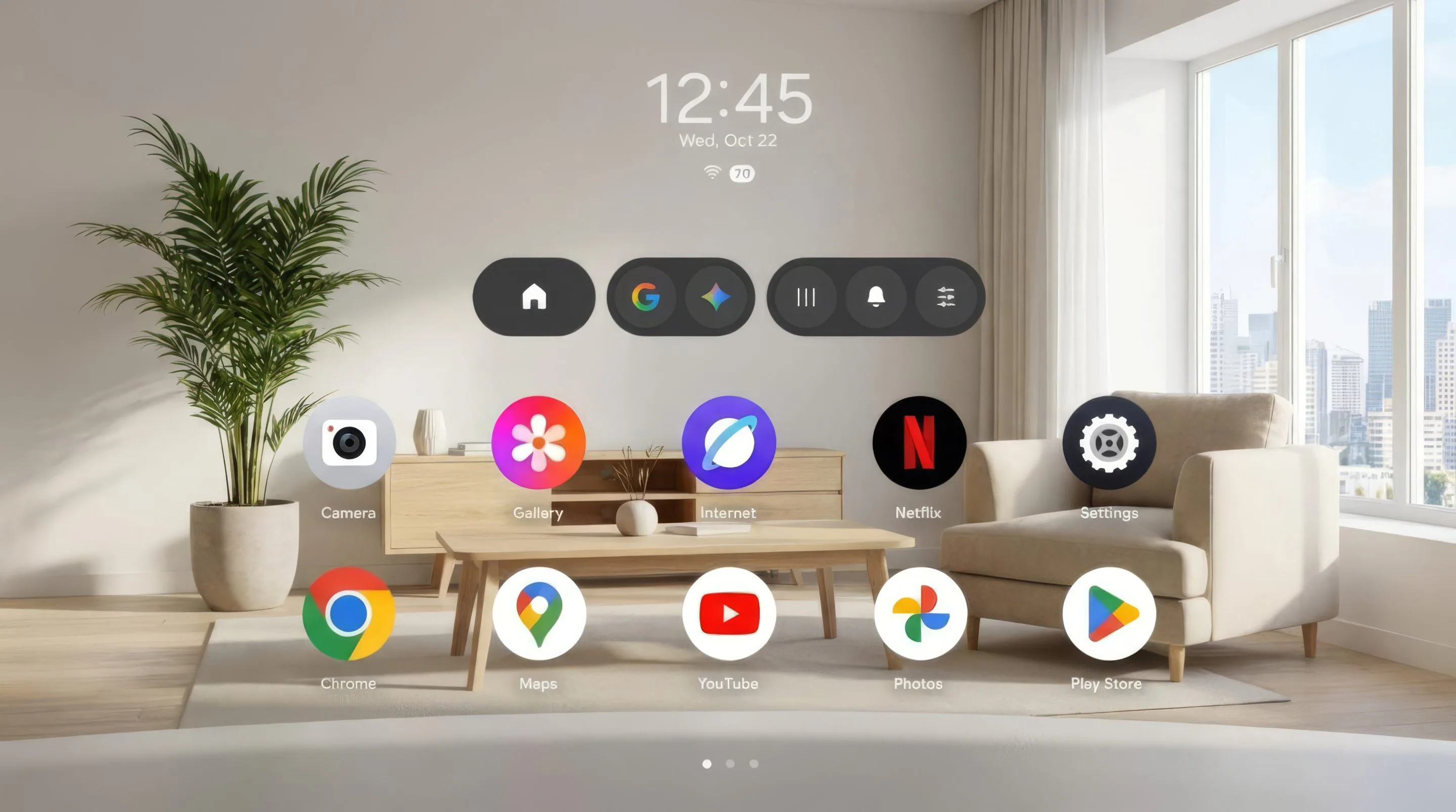

13 MIN READ
This Android XR development guide shows you how to build your first app on Google’s spatial computing platform in 2026. Android XR is Google’s operating system for extended reality headsets and glasses, built on the same Android foundation you already ship on. Your Kotlin and Jetpack Compose skills carry over directly. The fastest first project is not a bespoke immersive world. It is an app you already have.
That is the stance this guide argues. For most teams shipping their first Android XR app, the right move in 2026 is to spatialize an existing Android app with Jetpack Compose for XR rather than build a full immersive experience from zero. The platform’s real advantage is that your current codebase is the starting line. Teams that ignore that to chase room-scale immersion are the teams that blow their first XR budget.
Key Takeaways
- Android XR runs on the Android foundation, so existing Kotlin and Jetpack Compose code ports into spatial apps without a new language.
- Jetpack SceneCore, ARCore for Jetpack XR, and XR Runtime reached beta in August 2026, signaling the SDK is stable enough for production work.
- Samsung Galaxy XR ships at $1,799.99 and is the primary device you can build and test on today.
- Unity 6, Unreal Engine 5.6.1, and Godot are all officially supported as of Developer Preview 4 (May 2026).
- Android XR app development costs roughly $50,000 for a simple app and $200,000 or more for an enterprise platform.
What Android XR Devices Can Developers Target in 2026?
Android XR development in 2026 spans four device form factors, and each is served by a different set of Jetpack libraries. The two immersive categories are XR headsets and wired XR glasses. The two lightweight categories are display glasses and audio glasses. Choosing which pair you build for is the first architectural decision, because the library stacks do not overlap.
XR Headsets and Wired XR Glasses
XR headsets and wired XR glasses are the fully immersive Android XR devices, and the Samsung Galaxy XR is the reference headset developers build on today. According to Samsung’s 2026 specifications, the Galaxy XR sells for $1,799.99 and carries dual 3,552 by 3,840 Micro-OLED displays at 4,032 pixels per inch, a Snapdragon XR2+ Gen 2 processor, 16 GB of RAM, and 256 GB of storage. It weighs 545 grams and runs from an external battery pack rated for about two hours of general use.
The headset targets mixed reality with full passthrough, so your app can render virtual content anchored to a real room. Wired XR glasses, such as XREAL’s Project Aura, form the second immersive category and reach developers through Google’s early-access programs. Both device types use the same immersive libraries: Jetpack SceneCore for 3D, Jetpack Compose for XR for spatial UI, and ARCore for Jetpack XR for perception. If you do not own hardware yet, the Android XR Emulator inside Android Studio covers most of this work.
Display Glasses and Audio Glasses
Display glasses and audio glasses are the lightweight, companion-driven Android XR devices, and they use a completely different development model from headsets. These glasses run off a paired Android phone rather than an onboard immersive runtime. Google and Samsung confirmed that the first Android XR glasses, designed with Warby Parker and Gentle Monster, launch in Fall 2026, with display versions expected in 2027.
Here is the fork that the official documentation does not spell out plainly. Code written for glasses uses Jetpack Projected and Jetpack Compose Glimmer, while code written for headsets uses SceneCore and ARCore for Jetpack XR. These stacks are not interchangeable. A spatial panel you build for Galaxy XR will not run on audio glasses, and a Glimmer interface for display glasses will not render inside a headset scene. Decide the form factor before you write the first screen, because switching later is a rebuild, not a port.
What Is the Jetpack XR SDK and What Does It Include?
The Jetpack XR SDK is Google’s official collection of libraries for building Android XR apps, and it reached a milestone in 2026 when its core libraries moved from preview to beta. As Google documented in its August 2026 announcement, Jetpack SceneCore, ARCore for Jetpack XR, and XR Runtime all reached beta, with the latest SceneCore release published as version 1.0.0-beta02. Beta matters here. It means the API surface is frozen enough to build production code against.
That beta transition changes the calculus for anyone who held off during 2025. Preview-stage APIs can break between releases, which is why cautious studios waited. With SceneCore, ARCore for Jetpack XR, and XR Runtime in beta, a team can now scope a multi-month build without budgeting for a mid-project API rewrite. The one caveat: Jetpack Compose for XR beta was still forthcoming as of the August 2026 announcement, so spatial UI code carries slightly more churn risk than the scene and perception layers.
Libraries for Immersive Experiences
The immersive Android XR libraries handle 3D content, spatial UI, and real-world perception for headsets and wired glasses. Google’s Jetpack XR SDK documentation groups them into four pieces. Jetpack SceneCore builds and manipulates the 3D scene graph through an entity-component system, plays spatial audio, and loads glTF models. In the beta release, the old AnchorEntity class was renamed AnchorSpace, a new common SpaceEntity class arrived, and Session.create became a Kotlin suspend function.
ARCore for Jetpack XR supplies perception: motion tracking, hit testing, plane detection with semantic labels, and persistent anchors. Jetpack Compose for XR adds spatial composables like panels and orbiters. Material Design for XR provides adaptive Material components that lay themselves out in space. Underneath all of them, the XR Runtime manages the session and device lifecycle. One practical note from the documentation: ARCore for Jetpack XR runs on Android XR only, unlike the legacy ARCore SDK that also served phones.
Libraries for Augmented Experiences
The augmented Android XR libraries handle lightweight glasses experiences that run from a companion phone, and there are two of them. Jetpack Projected manages phone-to-glasses projection, hardware permissions, and capability detection through a Device Availability API tied to Android Lifecycle states. It also ships a ProjectedTestRule to simplify unit testing. Jetpack Compose Glimmer is the UI toolkit tuned for optical see-through displays, with glasses-specific theming, the Google Sans Flex typeface, and interactive components built for glanceable reading.
The rule to remember stays simple. If your app targets audio or display glasses, Jetpack Projected and Jetpack Compose Glimmer are the libraries that apply, and SceneCore and ARCore for Jetpack XR do not enter the picture. This is the same fork from the device section, now expressed in dependencies.
How to Set Up Android Studio for Android XR Development
Setting up Android XR development takes standard Android Studio, the Jetpack XR SDK dependencies, and either a Samsung Galaxy XR or the Android XR Emulator. There is no separate IDE to learn and no exotic toolchain. If you can build a phone app in Android Studio today, you already have most of what you need to build for Android XR.
Installing the SDK and Configuring the Emulator
Getting a first Android XR project running follows a short sequence, and Google’s getting-started guide covers each step in detail. The path looks like this:
- Install the latest stable Android Studio, which includes the XR tooling and templates.
- Create a new project using the Android XR template in the New Project wizard.
- Add the Jetpack XR SDK dependencies through Gradle, such as the SceneCore beta artifact for immersive apps or the Projected library for glasses.
- Set up the Android XR Emulator through the AVD Manager. The emulator renders spatial layouts and core interactions, so you can iterate without a headset on your desk.
- Connect a Samsung Galaxy XR over standard ADB when you are ready for on-device testing.
In our own Android XR work at Frame Sixty, an AR/VR and spatial computing development studio, most day-to-day iteration happens in the emulator, not on the headset. We reserve device time for the things an emulator cannot fake: passthrough lighting, real hand tracking, comfort over a 20-minute session, and the weight of that external battery pack during a long QA pass. A practical rhythm is to build and validate layout logic in the emulator every day, then batch on-device checks a few times a week. For developers chasing early glasses hardware, the Android XR Developer Catalyst Program is the route to pre-release devices.
How to Build Spatial UI with Jetpack Compose for XR
Jetpack Compose for XR lets you build spatial user interfaces by extending the Jetpack Compose you already know, so existing 2D Compose screens become the raw material for 3D layouts. You place standard Compose UI inside a SpatialPanel, add Orbiter elements for menus that float around the user, and wrap the arrangement in a Subspace. There is no new UI language to learn, which is the whole point of the Compose-first approach.
Material Design for XR handles much of the spatial arrangement automatically through its adaptive components, so a layout built for a phone can reflow into a spatial panel without hand-tuning every dimension. For 3D content inside that UI, Developer Preview 4 added native glTF support through the SpatialGltfModel composable, letting you drop a 3D model into a Compose hierarchy the same way you would place an image.
Google also shipped a shortcut worth knowing. Auto-Spatialization, an experimental feature from the April 2026 update, converts an unmodified 2D app into a spatial layout with one tap. Juston Payne, Senior Director of Product for Android XR, described it in Google’s April 2026 feature announcement: Auto-Spatialization lets you “convert almost any 2D app, website, or video into a spatialized 3D experience with a single tap.” Use it to test whether spatializing your app is worth deeper investment before you write XR-specific code. That test is free, and it settles the build-or-spatialize question fast.
Need help with Android XR development?
We are here to help!
How to Add ARCore Perception Features to an Android XR App
ARCore for Jetpack XR adds real-world perception to an Android XR app, letting your content understand and react to the physical space around the user. You add the dependency, create a session through the XR Runtime, and request the perception capabilities your app needs. SceneCore then renders your response to what ARCore detects. The two libraries share one session and work as a pair.
The perception features break down into a few concrete capabilities:
- Plane detection with semantic labels identifies floors, walls, ceilings, and tables so virtual objects rest on real surfaces instead of floating.
- Hit testing places content where a user looks or points.
- Persistent anchors keep content in the same physical spot across session restarts.
- Depth estimation drives occlusion and physics, so a virtual ball rolls behind a real couch.
Beyond the room, the ARCore Geospatial API entered early preview in Developer Preview 4. Google’s May 2026 update reports it ties anchors to real-world coordinates through the Visual Positioning System across more than 87 countries, currently for wired XR glasses. That capability points at outdoor and location-based experiences, which the headset-only perception stack cannot address on its own.
Unity, Unreal, or Godot: Which Engine Should You Use for Android XR?
Android XR officially supports Unity, Unreal Engine, and Godot as of Developer Preview 4, so choosing an engine is now a real decision rather than a default. In 2025, Unity was effectively the only serious path. Google’s June 2026 ecosystem update confirmed the expanded engine support and introduced the Android XR Engine Hub, a Windows desktop tool that streams device perception data straight into an engine viewport for real-time testing.
Each engine fits a different team, as this comparison lays out:
| Path | Status on Android XR | Best for |
|---|---|---|
| Unity 6 / AR Foundation | Mature, largest community | Studios on Unity or targeting Meta Quest too |
| Unreal Engine 5.6.1 | Developer preview, vendor plugin | High-fidelity visuals, existing Unreal teams |
| Godot | Developer preview | Indie developers, open-source toolchains |
| Jetpack Compose (native) | Beta core libraries | Android teams porting existing apps |
The engine decision is really a portfolio decision, and this is where the cross-platform angle earns its weight. Because Android XR shares an OpenXR 1.1 foundation with Meta Quest, one Unity 6 build can target both platforms. A studio that already ships to Quest can reach Android XR without a second codebase, which changes the return math against a single-platform native build. If your roadmap includes Quest, Unity is the pragmatic default. If it does not, and your app is UI-heavy rather than simulation-heavy, native Jetpack Compose keeps the whole thing inside your Android team.
How Android XR Development Compares to visionOS Development
Android XR and visionOS target the same spatial computing category but suit different teams: Android XR fits developers working in Kotlin, Unity, or Unreal, while visionOS fits Swift and SwiftUI specialists inside the Apple ecosystem. The platforms diverge on four practical points that shape a project’s cost and staffing.
| Factor | Android XR | Apple visionOS |
|---|---|---|
| Core stack | Kotlin, Jetpack Compose | Swift, RealityKit, SwiftUI |
| Cross-platform reach | Shares OpenXR 1.1 with Meta Quest | Separate codebase |
| Reference device price | Galaxy XR, $1,799.99 | Vision Pro, $3,499 |
| Enterprise MDM | Six partners, fully managed only | Narrower MDM tooling |
The staffing consequence is the part that rarely makes the spec sheets. An Android XR project can often run on the Android engineers a company already employs, since the language and UI framework match. A visionOS project usually means Swift and RealityKit specialists, which is a separate hire or a separate contract. On deployment, Google’s Android Enterprise support, detailed in Jason Bayton’s April 2026 analysis, validated six EMM partners including Microsoft Intune and Samsung Knox Manage, though only fully managed device mode is supported and BYOD is not yet available. For an IT fleet already standardized on Android, that shared management path is the shorter road to a deployed headset. If your users live on Android, Android XR is the lower-friction bet.
How Much Does Android XR App Development Cost?
Android XR app development costs roughly $50,000 for a simple spatial app and $200,000 or more for a complex enterprise platform, a range comparable to visionOS and Meta Quest projects of similar scope. The final number depends less on the platform and more on how much you build from scratch versus reuse. Scope drives the budget.
The main cost drivers are straightforward:
- Scope. Spatializing an existing Android app through Compose for XR sits at the low end. Building an immersive experience with custom 3D art sits at the high end.
- Engine choice. Native Compose keeps work inside your Android team. Unity or Unreal often means engine specialists billed separately.
- Enterprise integration. MDM setup, kiosk-mode lockdown, and IT acceptance testing add project-management overhead.
- Timeline risk. The move to beta libraries in August 2026 lowers integration risk, though the still-stabilizing Compose for XR beta warrants a small schedule buffer.
At Frame Sixty, the single biggest lever on an Android XR budget is that first build-or-spatialize decision, which is why we push clients to prototype with Auto-Spatialization before committing to a bespoke scene. A spatialized version of an existing app reuses your screens, your data layer, and your Android engineers, so the cost lands near the bottom of the range. A ground-up immersive build adds 3D modeling, scene optimization, comfort tuning, and device QA, each of which is its own workstream. The emulator-first workflow also trims cost compared with 2025, when a physical headset was the only place to test anything at all.
Conclusion
Building your first app on Android XR in 2026 is more approachable than it was a year ago, and the reason is boring in the best way: the platform is Android. Your Kotlin runs, your Compose screens spatialize, and your Android engineers stay on the project. The core Jetpack XR SDK libraries are in beta, the Samsung Galaxy XR is shipping, and Unity, Unreal, and Godot all have official support. The market is moving too. According to the Treeview XR Market Statistics Report drawing on IDC Q3 2025 data, XR device shipments grew 41.6 percent year over year in 2025 to about 14.5 million units, and the same report projects the XR market to climb from $20.43 billion in 2025 to $85.56 billion by 2030.
The guidance holds from where this guide started. Spatialize before you rebuild. The teams that ship a useful Android XR app first are the ones that treat their existing codebase as the foundation and reserve full immersion for the cases that genuinely need it. Test the spatialized version with Auto-Spatialization, measure whether it earns deeper work, and only then commit to a bespoke scene. That sequence protects your budget and gets something in front of users sooner.
If you would like to explore Android XR development for your business, reach out to us at Frame Sixty. Our team works across Android XR, visionOS, and Meta Quest, and we can help you decide whether spatializing an existing app or building a new immersive experience is the right first move.
FAQs
Common questions about building your first Android XR app in 2026, covering SDK readiness, tooling, device targets, and enterprise deployment.
The Jetpack XR SDK is stable enough for production apps in 2026 at its core layers. As of Google's August 2026 announcement, Jetpack SceneCore, ARCore for Jetpack XR, and XR Runtime reached beta, meaning the API surface is frozen enough to build production code against, with SceneCore at version 1.0.0-beta02. Jetpack Compose for XR beta was still forthcoming, so spatial UI code carries slightly more churn risk.
Android XR apps are built primarily in Kotlin with Jetpack Compose, the same stack Android developers already use, because Android XR runs on the Android foundation. Existing Kotlin and Compose code ports into spatial apps without a new language. Teams that prefer a game engine can instead use Unity 6, Unreal Engine 5.6.1, or Godot, all officially supported as of Developer Preview 4.
Developing for audio glasses versus XR headsets uses two non-interchangeable library stacks. Audio and display glasses run from a paired Android phone and use Jetpack Projected and Jetpack Compose Glimmer. XR headsets like the Samsung Galaxy XR run an onboard immersive runtime and use Jetpack SceneCore and ARCore for Jetpack XR. A panel built for a headset will not run on glasses, so choose the form factor first.
The Android XR Emulator is a virtual device inside Android Studio that renders spatial layouts and core interactions without a physical headset. You set it up through the AVD Manager, then iterate on layout logic daily without a Galaxy XR on your desk. It cannot fake passthrough lighting, real hand tracking, or comfort over a long session, so developers reserve on-device testing for those.
Android XR supports OpenXR 1.1, the same foundation Meta Quest uses, which means one Unity 6 build can target both platforms. A studio already shipping to Quest can reach Android XR without maintaining a second codebase, changing the cost math against a single-platform native build. This shared standard makes engine choice a portfolio decision rather than a one-device commitment.
The Android XR Engine Hub is a Windows desktop tool that streams device perception data straight into a game-engine viewport for real-time testing. Introduced in Google's June 2026 ecosystem update, it works with Unity, Unreal, and Godot, letting developers test against live perception data without exporting a full build each time.
The Android XR Developer Catalyst Program is Google's route to pre-release Android XR hardware, including early glasses devices and XREAL's Project Aura. It opened alongside Developer Preview 4 in May 2026 and offers early hardware access to selected developers. Teams chasing pre-release devices apply through Google's Android XR developer channels to join the program.
Deploying enterprise apps on Samsung Galaxy XR uses Android Enterprise, which shipped for the device via an April 2026 firmware update. Google validated six EMM partners, including Microsoft Intune and Samsung Knox Manage, for device management. Only fully managed device mode is supported today; work profile and BYOD are not yet available, so plan fleets as company-owned.
An Android XR development partner should have hands-on experience across form factors and engines, not just one headset. Frame Sixty, an AR/VR and spatial computing development studio, works across Android XR, visionOS, and Meta Quest, and advises clients on whether to spatialize an existing app or build a new immersive experience. Look for a partner that prototypes with Auto-Spatialization before committing to a bespoke scene.
Get in touch
We’re interested to see how we can help. Send us a message and we will get back to you within 24 hours.